How to Delete All Promotions in Gmail (Without Losing Important Emails)
May 13, 2026 · Written by Raghu Kumar
Is your Gmail Promotions tab overflowing with thousands of unread emails — sale alerts, newsletters, and offers you never signed up for? You're not alone. Over time, the Promotions tab becomes one of the most cluttered corners of your inbox.
The good news: you can wipe it all out in just a few clicks. Here's exactly how to do it.
Step-by-Step: How to Delete All Promotions in Gmail
Step 1: Open the Promotions Tab
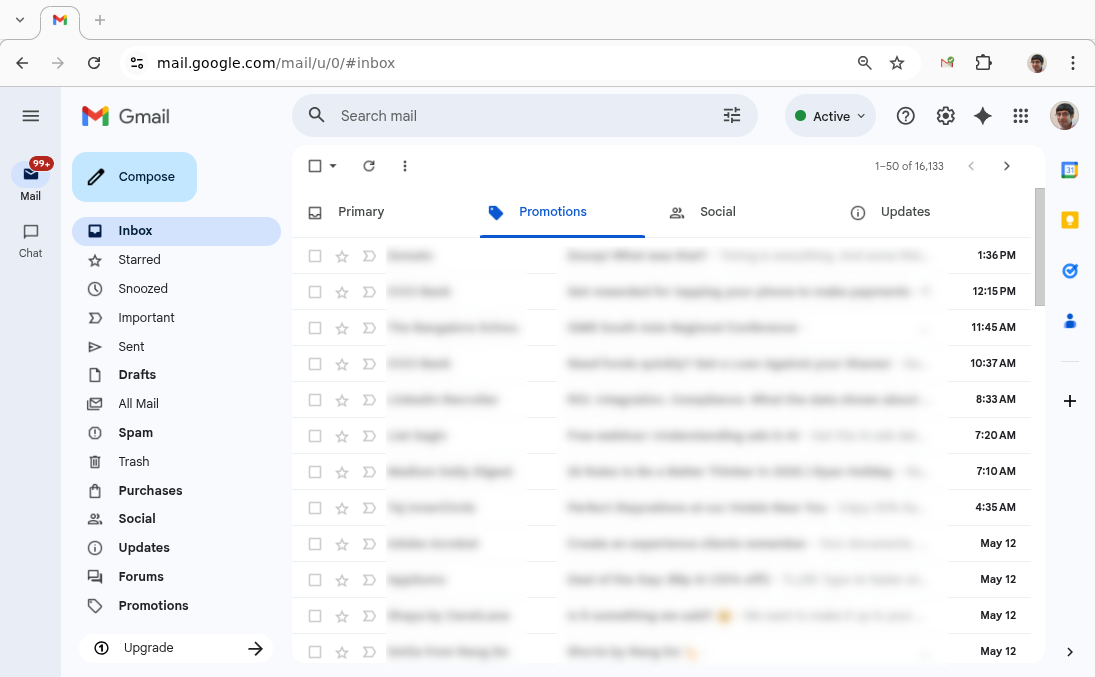
Log in to your Gmail account and click on the Promotions tab just below the search bar. This is where Gmail automatically filters all marketing and promotional emails.
Step 2: Select All Emails on the Page
Click the checkbox in the top-left corner of the email list (just above the first email). This selects all the emails currently visible on the page — typically around 50.

Step 3: Select ALL Conversations, Not Just This Page
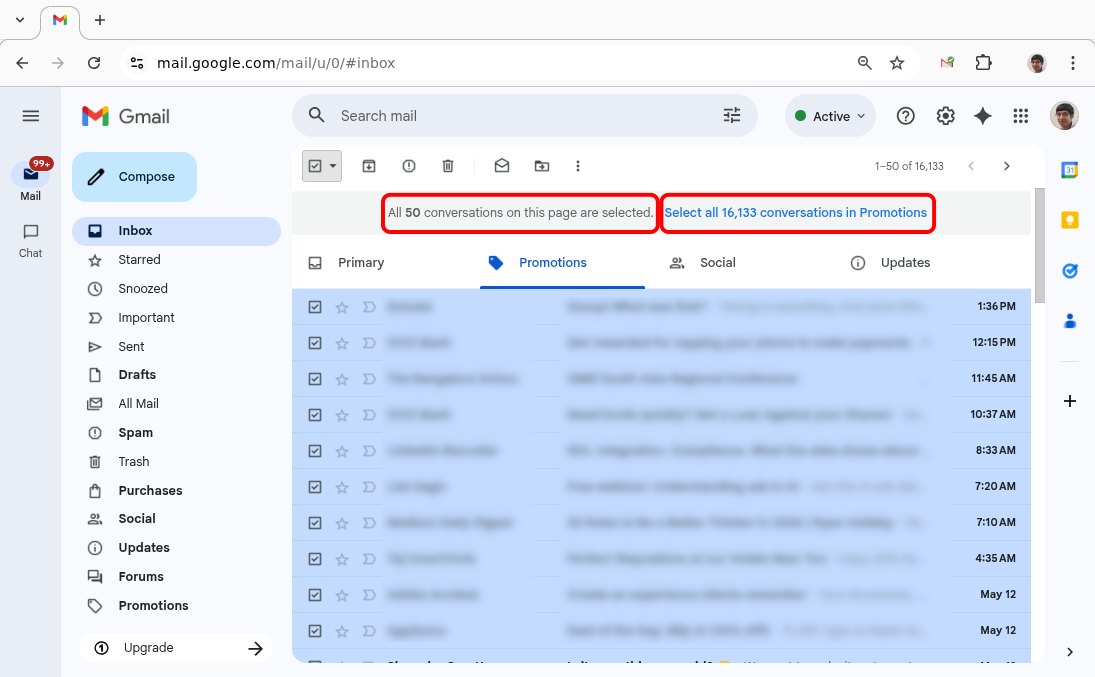
Once you check that box, a message will appear at the top of the list:
"All 50 conversations on this page are selected."
Right next to it, you'll see a link that says "Select all X conversations in Promotions." Click that. This is the crucial step — it extends the selection to every single email in your Promotions tab, not just the ones visible on screen.
Step 4: Delete Everything
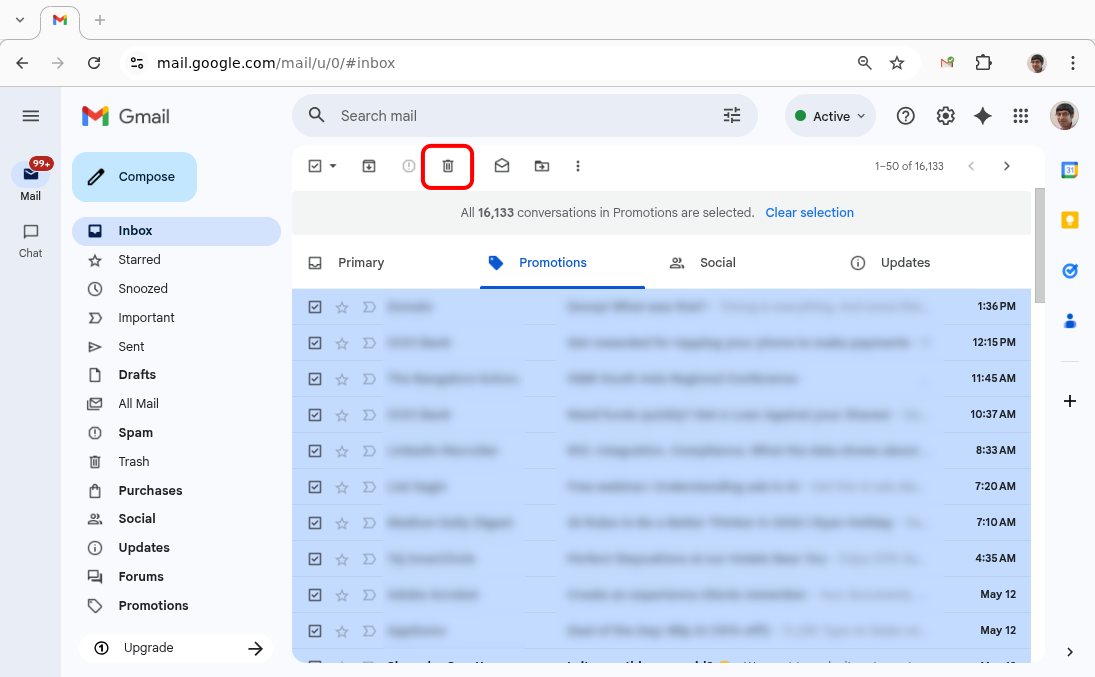
Now hit the Delete (trash icon) button in the toolbar. Gmail will ask you to confirm. Click OK.
That's it. Gmail will now process the deletion on its servers - within a short while, all promotional emails will be moved to Trash, and your Promotions tab will be completely empty. ✅
But Wait — Did You Just Delete Something Important?
Now that your Promotions tab is spotless, here's a question worth sitting with: are you absolutely sure nothing important was in there?
Here's the uncomfortable truth — Gmail's categorization is not perfect. Its algorithm does a decent job, but it regularly misfires and dumps genuinely important emails into the Promotions tab. Things like:
| Email Type | Why It Gets Misfiled |
|---|---|
| Flight confirmations & hotel bookings | Travel emails with images/buttons look promotional |
| Bank statements & financial summaries | Branded HTML emails from financial institutions |
| Job alerts & interview invitations | Sent from automated platforms like LinkedIn or job boards |
| Newsletter subscriptions you opted into | Has unsubscribe links, images — key promo signals |
| Cold outreach / business emails | Carefully written cold outreach or product updates can get buried under clothing sale notifications and restaurant coupons, with reply rates dropping 60–80% |
| Client invoices | A receipt from a SaaS tool used daily, or a booking confirmation, can all end up in Promotions |
These emails often look "promotional" to Gmail's filters, but losing them can cause real problems.
And here's the kicker — once you delete everything in bulk, there's no easy way to get it back. Deleted emails sit in Trash for 30 days, but finding one specific email buried among thousands of trashed promotions is like finding a needle in a haystack.
So while the bulk-delete method works, it's essentially a gamble. You're betting that nothing important slipped through — and that's a bet you could lose.
A Smarter Way to Clean Up: Use Clear Mail
What if you could get a clean Promotions tab without the anxiety of losing something important? That's exactly what Clear Mail is built for.
Instead of deleting blindly, Clear Mail takes a targeted approach:
- 📬 Groups your Promotions emails by sender — so you can see exactly who is flooding your inbox
- 📊 Shows you the top offenders — the senders with hundreds of emails you'll never read
- 🗑️ Lets you delete by sender — wipe out all emails from a specific spammy brand in a few clicks, while leaving others untouched
This means you can eliminate the noise — that online store you bought from once in 2019, the newsletter you never remember subscribing to — without touching the emails that actually matter.
Bulk Delete vs. Clear Mail: Which Should You Use?
| Bulk Delete | Clear Mail | |
|---|---|---|
| Speed | Instantaneous | Fast |
| Risk of losing important emails | High | Low |
| Control over what gets deleted | None | Full |
| Identifies top spam senders | ❌ | ✅ |
| Peace of mind | ❌ | ✅ |
Conclusion
Deleting all your Promotions emails in Gmail is quick and satisfying — but it comes with real risk. One bulk delete and an important invoice, job offer, or booking confirmation could be gone before you realise it.
Clear Mail gives you the best of both worlds: a clean, clutter-free Promotions tab and the confidence that nothing important got caught in the crossfire. Instead of deleting everything and hoping for the best, you delete smarter — sender by sender, on your own terms.
To know more, check out our Getting Started Guide for a quick walkthrough. And if you're ready to dive in:
Go back to Blog